You’ve done some exploring. Now you understand this website and how this program will work. There is no time like the present to setup your very own personal blog in order to begin recording your thoughts, discoveries and exercises in. For this program, I recommend that you use Blogger*, a popular free online blog hosting service that is extremely easy to use.
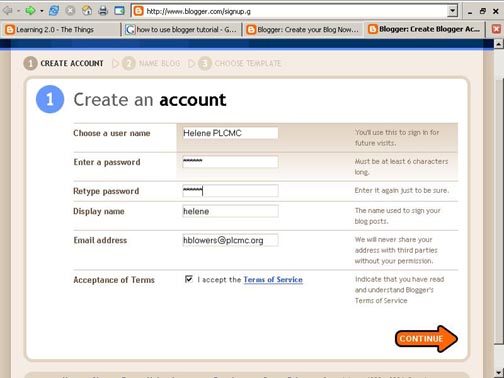
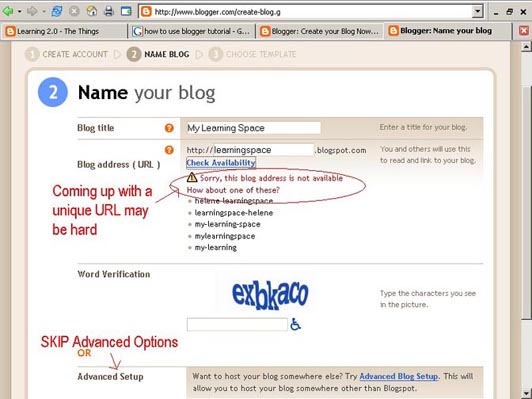
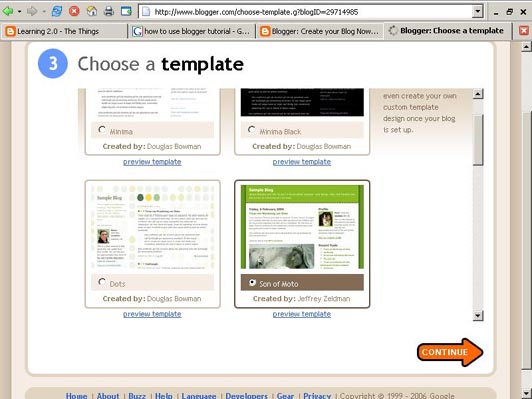
Creating a blog using Blogger takes just three steps:
- Create an account (view screenshot)
- Name your blog (view screenshot)
- Select your template. (view screenshot)
Once you’ve created your blog here are two important things to know:
- To add posts: The maintenance interface that you will use to add posts, edit or change the step-up your blog is accessed online at http://www.blogger.com/ Be sure to write down your login and password.
- To view your blog: Your blog address is http://(xxxx).blogspot.com, (xxxx)=the unique identifier you entered in Step 2. Be sure to also write down your blog address.
If you run into problems or would like more information about blogs and using Blogger here are some discovery resources you can use:
OK -- Now, it’s your turn...
Discovery Exercise:
- Setup a blog for yourself through Blogger.
- Add a test post or two.
Note: Use one of your test posts to create an entry about the habits among the 7 and 1/2 lifelong learning habits that is easiest and hardest for you & why. - Write a blog entry about blogging.
- Have fun!!!!
IMPORTANT NOTE: How you choose to identify yourself on your blog is your choice. You can blog under a screen name, anonymously, or as yourself. However, in order to qualify for the staff incentives and staff day prize drawings, you will need to register on Tracking your Progress Form.
* Use of Blogger is only a recommendation. If there is another blog hosting site that you are more http://www.blogger.com/post-edit.g?blogID=324911506750358029&postID=8305497811025131202#
Post Optionscomfortable with, please feel free to use it.


 Posts
Posts


2 comments:
Hi there all you bloggers. I am having a hard time feeling unsure of what I am supposed to do. If I had wanted to set up a blog I would no doubt know what to do but doing it as an exercise is difficult. I do not know what to put where?
Hi Sue,
The blog is simply a method by which you log your experience with the various exercises (much like a diary or journal entry). Then you post the URL of that entry into the tracking form so at the end of the day (Nov. 7th) I can see who qualifies for the MP3 player. MP3 player or not, the exercises are meant to expand our existing knowledge of what's out there.
Post a Comment